


Speak Spanish: Palteca
4.758.00 Reviews
App Specs
- Version
- 2.10.2
- Updated On
- License
- Free
- Downloads
- 50,000+
- Developer
- Palteca Languages
- Categories
- Education
- Platform
- Android
Screenshots
 Analysis by AppCompare
I found Speak Spanish: Palteca most useful as a gentle starting point for people who want to build everyday Spanish vocabulary without feeling as if they have enrolled in a formal course. Its focus is practical speaking, and the learning experience is clearly aimed at beginners rather than advanced students looking for deep grammar analysis. After spending time with it, my main impression is simple: this is an approachable companion for creating a steady language habit, especially when I only have a few quiet minutes available.
The app is free to install, which makes it easy to try without committing money first. Palteca Languages presents it as an education app, and its current version is 2.10.2. It has a 4.7 average from around 2.6 thousand ratings and has passed 50 thousand installs, so it has already attracted a meaningful audience without feeling like an overcrowded mainstream platform.
Why the beginner-first approach works
The strongest part of this app is its sense of direction. Instead of making me begin with a large reference library or a complicated course map, it keeps attention on useful vocabulary and the act of speaking. That matters because many new learners recognize words when reading but hesitate when they need to say something aloud. An app built around practical language can help close that gap, even if it is not intended to replace conversation with a teacher or fluent speaker.
I also like that the learning promise is realistic for a beginner. The app does not need to be treated as a complete Spanish curriculum to be worthwhile. I would use it as the first layer: learn a useful expression, revisit it later, and gradually become more comfortable producing familiar words. That is a better role for it than expecting one mobile app to explain every regional variation, irregular verb, and grammatical exception.
A good routine is to open a lesson before a predictable daily activity, such as making coffee or waiting for public transport. I would concentrate on a small group of words, say them aloud rather than merely tapping through them, and then try to recall them later without looking. This turns the app from passive scrolling into a short speaking exercise. The extra effort is important because recognition alone can create a false sense of progress.
One of the more useful ways to approach the material is to connect each new term to a real situation. If I am preparing for a trip, I would group my attention around greetings, food, directions, and simple requests. If I am learning for family communication, I would prioritize the vocabulary that matches those conversations. The app is more valuable when I decide what I want the language to do for me instead of treating every session as an abstract memory test.
Its beginner orientation also makes it less intimidating than many traditional alternatives. A textbook can be thorough but demanding, while a classroom may require a fixed schedule and a level of confidence that a new learner does not yet have. Speak Spanish: Palteca fits the gap between those options: it gives me a private place to start, repeat, and make mistakes without an audience.
Worth Reading Before You Choose

Flipboard Shows What News Apps Must Do Beyond the Feed

Switching to Android Auto Means Rethinking Your Driving Routine

Google Calendar Makes a Crowded Week Easier to Manage

Ludo King Makes the Most of the Minutes Between Plans

Baby Panda World Brings Quick Play to Modern Phones, but Its Game Library Feels Busy

ESPN’s Live Game View Makes Following Close Games Easier
Small sessions are the right way to use it
I would not judge progress by how long I stay inside the app. Short, repeated contact is a better match for vocabulary learning than an occasional marathon session. A practical pattern is to review earlier material first, study a modest amount of new content, and finish by saying a few phrases from memory. This sequence exposes what I actually remember instead of letting recognition carry the whole session.
Another useful habit is to avoid opening the app only when I feel motivated. A fixed cue works better: after breakfast, during a lunch break, or immediately before an evening wind-down. The app’s accessible design makes it suitable for these moments, but the learner still has to supply the consistency. No language tool can create fluency if it is used only once every few weeks.
For a traveler, I would begin using it before the trip rather than waiting until arrival. Even a small amount of preparation can make basic interactions feel less stressful. I would practice saying the words, not just identifying them, and keep expectations modest. The goal would be to handle familiar situations with more confidence, not to sound like a native speaker after a handful of sessions.
Where it fits beside other Spanish-learning options
Compared with a conventional course, this app feels lighter and easier to approach. A structured class is the better choice for someone who needs accountability, detailed correction, and a planned route through grammar. A textbook is stronger when I want explanations I can annotate and revisit in depth. A conversation exchange is more valuable once I need spontaneous replies and feedback on pronunciation.
Speak Spanish: Palteca makes the most sense before or alongside those options. It can help a complete beginner arrive at a lesson with some familiar vocabulary, or give a busy learner a low-pressure way to maintain contact with Spanish between classes. I would not use it as my only resource if my goal were professional writing, academic study, or advanced conversation. Its practical beginner focus is an advantage for one audience and a boundary for another.
There is also a difference between learning useful words and learning how Spanish behaves in full sentences. Vocabulary is necessary, but it does not automatically teach word order, agreement, tense, register, or the difference between expressions used in different countries. Anyone relying on this app should eventually add listening and real interaction. That is not a criticism of its central purpose; it is a reminder to use the tool for what it does best.
The main limitation is depth, not accessibility
My biggest reservation is that a beginner-friendly vocabulary and speaking app can make progress feel smoother than it really is. I may remember a phrase inside a familiar exercise yet struggle when a person speaks quickly or changes the wording. The transition from guided practice to spontaneous conversation remains a separate challenge, and I would want users to know that before treating a good session as proof of fluency.
The app is also less suitable for learners who want detailed grammatical reasoning at every step. If I need to understand why a sentence changes in a particular context, or if I want extensive written production tasks, I would look for a more comprehensive course and use this as a supplement. Learners who already have a strong foundation may likewise find the beginner emphasis too gentle.
There is a financial point to consider as well. The app itself is free, while optional in-app purchases range from $4.99 to $94.99 per item. That does not make the free starting point unhelpful, but I would check what is available without paying and decide whether the learning value justifies any upgrade before purchasing. The broad range means the cost of deeper access may matter differently to different users, so I would avoid assuming that every learner will have the same experience.
Another trade-off is that a mobile app cannot fully reproduce the pressure of a live exchange. When I practice alone, I control the pace and can repeat an item immediately. That is comfortable and useful, but it does not test whether I can understand an unexpected reply. To compensate, I would combine the app with short audio exposure, a tutor, or simple conversations once the basic vocabulary starts to feel familiar.
Who will get the most from it
I would recommend this app to someone who is starting Spanish from scratch, feels nervous about traditional study, or wants a convenient way to work on useful vocabulary. It is especially appealing to people who prefer private practice before speaking with others. A traveler preparing for basic interactions, a busy adult building a daily routine, or a family member trying to recognize common expressions could all find a sensible entry point here.
It may also suit learners who have tried larger language platforms and felt distracted by too many paths, reminders, or course elements. Speak Spanish: Palteca’s clear beginner purpose can make the first step feel manageable. I would still encourage those users to keep a small notebook or notes file with phrases they personally expect to use. Writing down an example and adapting it to a real situation turns a lesson into something more memorable.
I would be more cautious about recommending it to an advanced student, a person preparing for an exam with a defined syllabus, or anyone who needs immediate conversational correction. Those learners need more than guided vocabulary practice. A teacher, a structured grammar resource, or regular interaction with fluent speakers would be a better primary choice, with this app serving only as additional review if its level remains useful.
Parents may appreciate that the content rating is Everyone, but I would still treat it as a tool for shared encouragement rather than an automatic substitute for instruction. A younger learner may benefit from a short routine and a parent who asks them to use a new word in context. The age rating makes the app broadly accessible, while the actual results will still depend on attention, repetition, and suitable expectations.
A practical routine for getting beyond tapping
If I were starting today, I would use the first session to understand the app’s rhythm rather than rush through as much material as possible. I would say each new item aloud, pause before revealing an answer, and mark the words that feel useful in my own life. Later that day, I would try to recall them while doing an unrelated task. This delayed recall is a simple way to discover which items have genuinely stayed with me.
During the following sessions, I would separate recognition from production. First, I would identify the meaning when seeing or hearing a word. Then I would cover the prompt and try to produce it myself. Finally, I would place it in a short sentence, even if the sentence is basic. This three-step workflow is more demanding than tapping the correct option, but it gives the app’s speaking focus a better chance to carry into real use.
I would also avoid collecting vocabulary without a purpose. Ten words connected to an upcoming restaurant visit may be more useful than a much larger collection I never expect to say. After a week of practice, I would review the items that repeatedly cause hesitation and spend less time on words that already come easily. That keeps sessions focused and prevents the familiar material from taking all the attention.
One realistic scenario shows where the app can help. Imagine I am visiting a Spanish-speaking city and usually rely on translation because I cannot begin a simple exchange. Before traveling, I could practice greetings, polite requests, food-related vocabulary, and directions in short sessions. Once there, I would use those prepared phrases first, listen carefully to the reply, and accept that I may need translation for anything more complex. The app would not make me independent in every conversation, but it could make the first attempt less daunting.
For someone learning at home, the same approach works differently. I might use a morning session for new vocabulary, then revisit it while shopping or cooking. If I live with someone who speaks Spanish, I could ask them to use one familiar word naturally rather than turning every interaction into a formal lesson. That creates a bridge between the controlled practice inside the app and the unpredictable nature of real speech.
My verdict after weighing the trade-offs
Speak Spanish: Palteca succeeds because it keeps the beginning of Spanish learning approachable. Its focus on speaking and useful vocabulary gives it a clear identity, and the free entry point lowers the risk of trying it. The 4.7 average and audience of over 50 thousand installs suggest that many learners have found the format appealing, though popularity alone is not a substitute for matching the app to my own goals.
I see it as a strong first step, not a complete language education. Used consistently, it can help a beginner create momentum, recognize practical words, and become more willing to speak. Used alone, it will not provide the full range of grammar, listening difficulty, feedback, and spontaneous interaction needed for advanced ability. That distinction is the key to getting a fair result from it.
Because it is free to begin and rated for Everyone, I think it is worth trying for learners who want a low-pressure introduction. I would keep the optional purchases in mind, but I would not pay simply because more content exists; I would first establish a routine and decide whether the app’s style fits me. The best reason to continue is that the practice helps me say something useful outside the app.
My final recommendation is therefore specific: choose it if you are a beginner who wants practical Spanish practice in manageable sessions and needs a friendly place to start. Skip it as your main resource if you already speak comfortably, need formal academic preparation, or expect detailed correction and live conversation. For the right learner, the work from Palteca Languages is a convenient and encouraging beginning, provided I pair it with real listening and real people as my confidence grows.
Pros
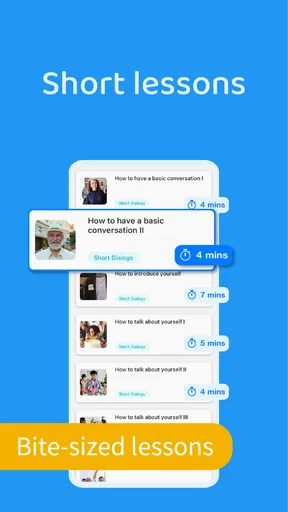
- Short lessons make it easy to practice during spare moments.
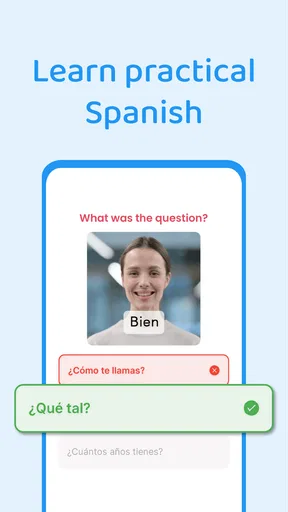
- Useful vocabulary focuses on everyday Spanish conversations.
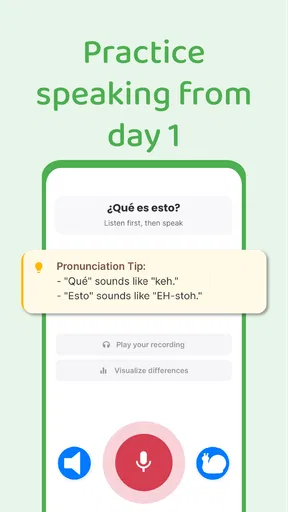
- Audio examples help improve pronunciation and listening skills.
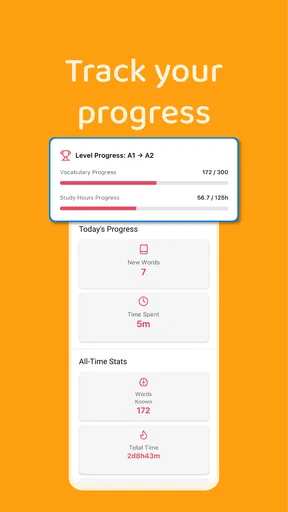
- Progress tracking can encourage consistent daily study.
- Suitable for beginners who need a simple learning starting point.
Cons
- Some content may feel limited for intermediate or advanced learners.
- Speech recognition can be inconsistent with different accents.
- A stable internet connection may be needed for certain features.
- The free version may restrict access to lessons or practice tools.
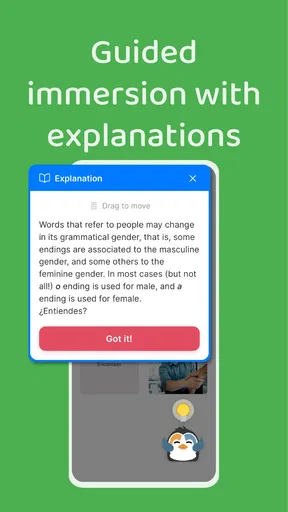
- Explanations may not cover Spanish grammar in much depth.
FAQs for Speak Spanish: Palteca
What is Speak Spanish: Palteca, and who is it designed for?
Speak Spanish: Palteca is a Spanish-learning app designed to help users build practical communication skills through guided lessons, vocabulary practice, pronunciation activities, and everyday expressions. It can be useful for complete beginners, travelers, students, and learners who want additional practice outside a classroom. Before downloading, keep in mind that the experience and lesson difficulty may suit casual learners better than advanced Spanish speakers seeking highly specialized grammar or professional fluency training.
Does Speak Spanish: Palteca teach Latin American or European Spanish?
The app’s content and pronunciation focus should be checked carefully by learners who need a particular regional variety of Spanish. Spanish differs between countries in vocabulary, accent, and common expressions, so lessons may not represent every Spanish-speaking region equally. Speak Spanish: Palteca is best viewed as a practical introduction to spoken Spanish, while users preparing to live, work, or study in a specific country may want to supplement it with regional resources and native-speaker practice.
Is Speak Spanish: Palteca suitable for complete beginners?
Yes, the app is intended to be approachable for users starting Spanish from the beginning. Its short, structured activities can help learners become familiar with basic words, phrases, pronunciation, and common conversation patterns without requiring previous knowledge. However, an app alone cannot replace regular speaking practice, listening to natural conversations, or feedback from a teacher. Beginners will usually get the best results by studying consistently and reviewing older material instead of rushing through lessons.
Does Speak Spanish: Palteca work offline, and does it require an internet connection?
Offline availability can depend on the specific lesson, feature, and version of the application. Some learning content may need to be downloaded first, while interactive exercises, progress synchronization, advertisements, updates, or account-related features may still require an internet connection. Users with limited mobile data should open the app over Wi-Fi and check whether lessons can be saved for offline use before relying on it during travel or in areas with unreliable connectivity.
Is Speak Spanish: Palteca free to download, and are there in-app purchases?
The app may be available as a free download, but some lessons, learning tools, premium content, or an ad-free experience can be restricted behind in-app purchases or a subscription, depending on the platform and current release. Before confirming a purchase, review the pricing page, billing frequency, trial terms, and cancellation conditions shown in the App Store or Google Play. Availability and prices may vary by country, device, and promotional offer.


